

The recent introduction of user defined instructions in AutomationDirect PLCs provides another tool for accelerating PLC and HMI development.
By Tim Ensminger, AutomationDirect
Many industrial automation products and practices have been developed as more robust versions of commercial-grade technologies. As microprocessors, memory, and communications hardware and software have evolved throughout the information technology (IT) world, they were commonly adapted to meet the demands of always-on applications in harsh operational technology (OT) environments, delivering economical yet high-performing solutions.
This approach is not only about making tougher hardware. It is equally important to consider the software programming and data handling capabilities of a platform. Both programmable logic controllers (PLCs) and human-machine interfaces (HMIs) employed for OT industrial automation applications have benefited from adopting IT-based object-oriented programming (OOP) concepts to speed development and improve consistency and performance. The latest example is the introduction of user defined instructions (UDIs) into the AutomationDirect Productivity PLC integrated development environment (IDE).
Object-Oriented Essentials
By encapsulating functionality and data, OOP empowers developers to create a typical software structure and then replicate or instantiate it as needed. A developer can protect information and logic within an instance of the structure, and pass necessary information into and out of the structure as needed. OOP enables developers to organize their programming and configuration work in useful ways when deploying it, using it, and updating it.
A standard PLC comes with several basic data types, such as bits, integers, floating point numbers, and more. An advanced PLC platform empowers developers to create a user-defined structure (UDS) of data, which combines several data types in a useful way. For example, a temperature scaling data structure might include the raw input signal, the engineering minimum/maximum, the scaled output, and high/low alarm thresholds and bits. If it becomes necessary to revise the UDS—perhaps to add a scaled output average—this can be done once and automatically propagated throughout the instances.
In order to show this data structure to an operator in a concise manner, an HMI like the AutomationDirect C-more CM5 series has provisions for developers to create graphical objects from basic static and dynamic elements, and link them to a UDS in the PLC. For the temperature example, the developer may create a data box which displays the scaled temperature, and changes color upon high or low alarm.
Logic Instructions as an Object
OT technologies of all types typically develop later and more slowly than their IT precursors. The most fundamental PLC programming language of all, ladder logic, was specifically developed to look more like electrical wiring diagrams and less like programming, so it would be more accessible for factory-floor technicians. Of course, PLC languages have developed over time to include advanced logical, mathematical, process control, motion control, and other functionality.
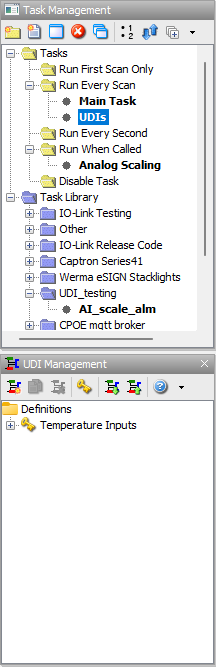
While some PLC platforms have had provisions for user-defined logic for many years, this capability is a bit of a step change from basic ladder programming. AutomationDirect evaluated the subject extensively before finally deploying user-defined instructions (UDIs) across their entire Productivity PLC platform (Figure 1). One key aspect included with this implementation is the ability for users to make runtime transfers after editing a UDI, which is not always possible with platforms from other vendors.
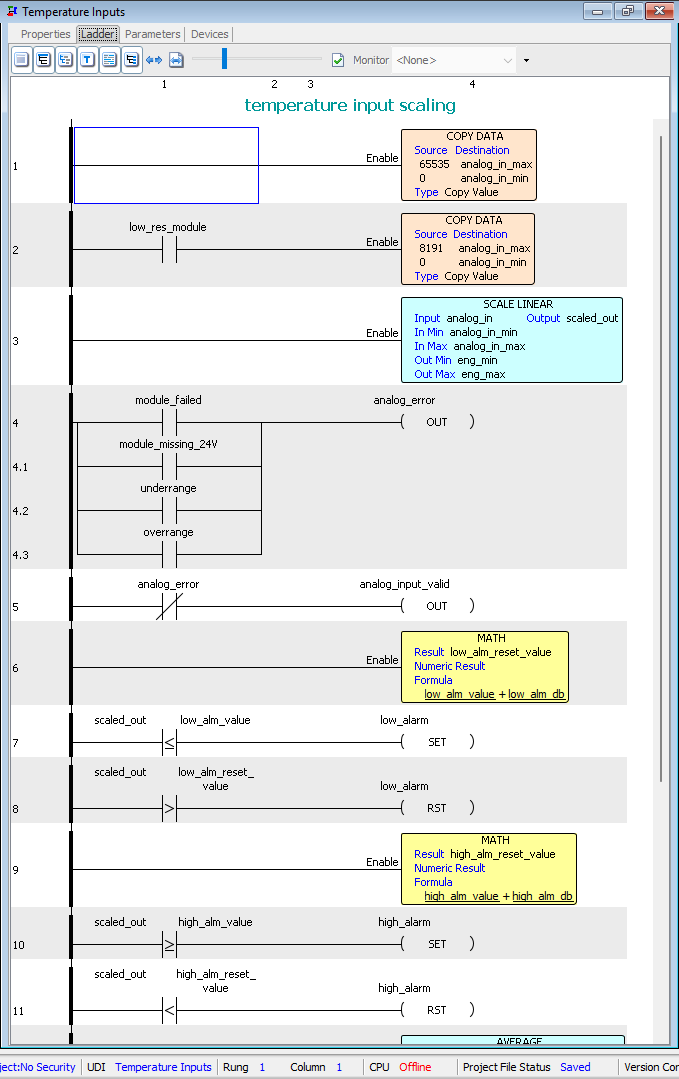
With UDI capability, developers can encapsulate the PLC logic in an organized manner. Continuing with our temperature example, the PLC logic could include provisions for mathematically scaling the value, monitoring module errors, and comparing the temperature with high/low alarm thresholds to generate alarm bits (Figure 2).
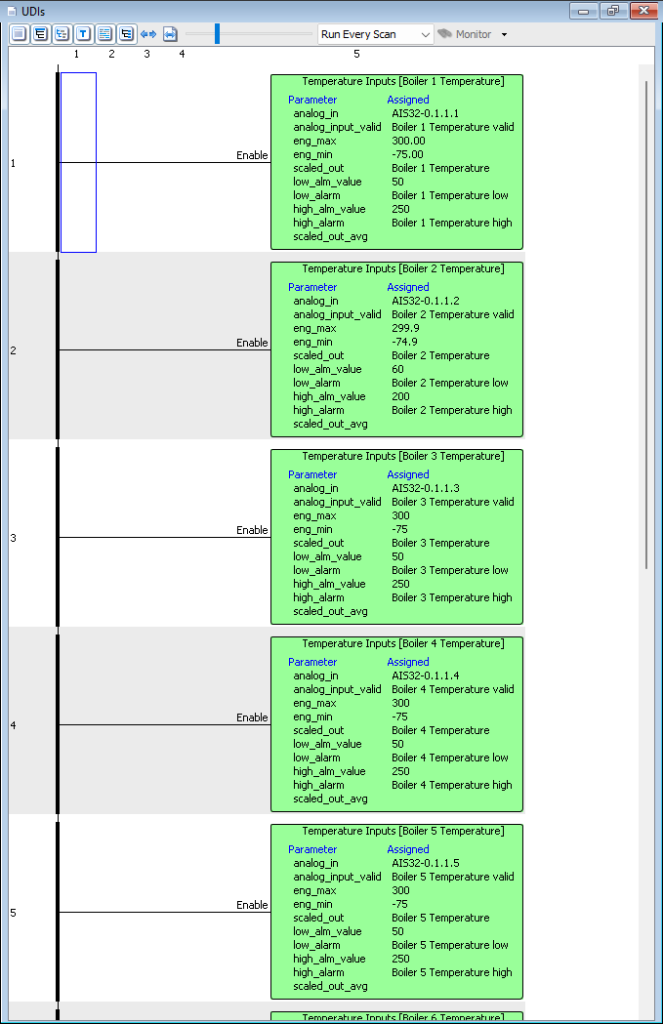
Instead of copying/pasting/editing rows of ladder instructions repeatedly, the developer can instantiate the temperature scaling logic UDI as needed and associate it with the proper UDS instance and analog input (Figure 3). If a change in the logic is necessary, it can be performed once and automatically propagated throughout the program.
Besides the development benefits of UDIs, this capability enables developers, especially original equipment manufacturers, to password-protect proprietary code and data within a UDI to avoid unintended access and operation. This UDI implementation is compatible with all Productivity PLCs with a firmware upgrade, including:
• The Productivity1000 standard stackable micro PLC
• The new Productivity1000 Mini PLC with on-board I/O
• The Productivity2000 micro-modular PLC
• And the top-shelf Productivity3000 modular PLC.
There are a few caveats. Some complex instructions, such as motion control and some communications, can’t be within a UDI, and runtime project transfers may be a bit slower. However, the benefits certainly outweigh these minor considerations.
Modern Programming is Accessible on the Factory Floor
Using an OOP approach, industrial automation developers can create a library of proven PLC code UDIs and data UDSs, along with corresponding HMI objects. This IT-originated capability is ready to use in the OT environment, accelerating development, promoting reusability of proven code, and minimizing errors.
Author Bio

Tim Ensminger is a product manager at AutomationDirect. During his two decade career, he worked primarily in the petroleum transportation industry designing and commissioning control and power systems for pipeline pump stations, tank farms, and truck loading facilities. Tim has worked at AutomationDirect since 2021 supporting the Productivity Series PLC products. He holds a bachelor’s degree in Electrical Engineering from Bob Jones University and a master’s degree in Electrical Engineering from Clemson University.