

How a small system integrator relies on proven automation products to reliably and responsively serve clients.
Byline: Mike Watkins, AutoWorks
Like enterprises in almost any sector of the economy, industrial automation systems integrators (SIs) come in a wide range of sizes. Many designers and developers, myself included, have worked at a few operations both small and large. And while there was much to appreciate in learning at larger organizations, I discovered my best fit by founding my own small SI company about a decade ago.
A one-man systems integration shop often can price jobs more competitively and maintain a tighter relationship with customers than larger businesses. Small operations are a backbone of American manufacturing, able to keep older lines running and taking on the jobs too specialized or too modest for a big SI to bother with. Small SIs do it efficiently, and they do it with accountability.
While SIs need to be well-versed in a certain range of products and technologies, a big part of how smaller shops can serve their customers comes down to something pretty simple: stick with products you know won’t let you down.
When a System Outgrows Itself
Since founding AutoWorks about a decade ago, the work mix has been mostly project work, with some ongoing service activities. While about 25% of project work is on completely new applications, the much larger portion involves upgrading systems that are already running. Sometimes the customer can provide a full scope of work with an I/O list, but much more often the work involves assessing an existing situation and producing the control architecture and work plan from scratch. I can also create the electrical drawings and perform other associated tasks, enabling AutoWorks to take full ownership of the controls design.
A recent typical project exemplifies how the work is tackled. In this case, an existing highway guardrail post production line had grown beyond what its original setup could handle. To improve throughput, another contractor was supplying and automating a refurbished robot (Figure 1). However, it was necessary to add upstream and downstream material handling automation and integration to coordinate everything. This would include a new programmable logic controller (PLC) and human-machine interface (HMI) assembled into a control panel.
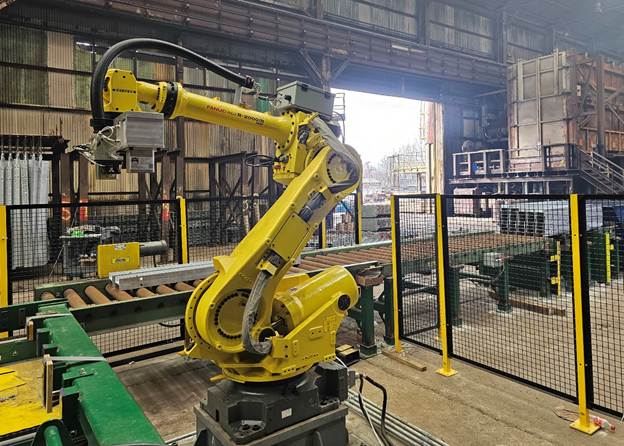
For this functionality, the posts first come out of the galvanizing process grouped in batches of 40. Operators use a forklift to position a batch at the start of the handling system, and from there they use a hoist to lay eight posts at a time down onto an infeed conveyor. Then, they press a foot switch which triggers the first conveyor zone to move the posts into a second zone, where a cylinder-driven pusher and a hard stop work together to collect them into groups and get them ready for pickup. The robot picks up the posts one at a time, and stacks them into 10 rows of 5 each, forming a palletized square bundle of 50. For industrial robots, manipulating materials is done by an end-of-arm tool (EOAT), which is typically custom designed and often involves the use of suction cups or grippers. In this case, the EOAT uses an electromagnet to carry the posts.
Once the last post layer in the bundle is released at the dropoff, the robot sends a “bundle complete” signal to the PLC. The PLC then uses this signal to cue the outfeed conveyor zones to carry the finished bundle out to a staging area for pickup. A forklift operator picks it up and presses a “clear” button to let the system know it can reset and start the next cycle.
In addition to other upgrades facilitating this functionality, the work included adding a variable frequency drive (VFD) to each conveyor zone, and a supervisory HMI. The ability to control the speeds and timing of the motors using VFDs comes in handy when integrating with various pieces of equipment, which often don’t sync up with each other naturally due to mechanical gearing or other issues. The HMI provides complete visibility and allows users to make easy operational adjustments.
Tying It All Together
As with most SI’s, I had already developed hands-on experience with many automation product brands and models. However, when there is not a hard specification for a specific project, experience has proven that AutomationDirect is a preferred supplier for all types of devices and components.
For PLCs, the CLICK family easily handles smaller jobs, the BRX offers much greater performance, while the Productivity family is very flexible. C-more HMIs and DURApulse VFDs are available in many popular sizes. The fact that AutomationDirect’s programming software doesn’t require a licensing fee is also a huge benefit, because as a solo operator (and also for many end users), trimming overhead wherever possible isn’t just smart, it’s necessary. AutoWorks is also part of the SI Direct program, which has helped direct interested end users to me.
Project development responsibility included interfacing with the end user and the robot SI to define the functionality, developing the PLC program and HMI configuration, generating settings for five VFDs, and establishing the communications interface with the robot. For the network, everything resided on a single EtherNet/IP (Ethernet Industrial Protocol) backbone, and I designed a control panel to house all the components (Figure 2).
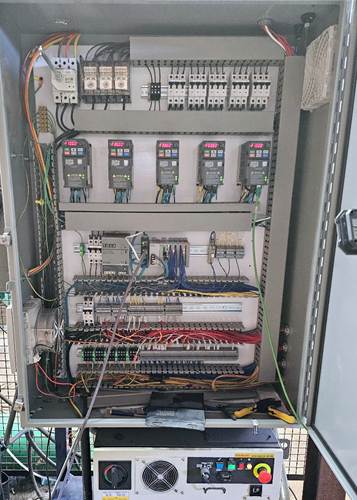
Network installation was significantly simplified because each VFD was ordered with an optional two-port Ethernet communications card, so all five could be daisy-chained without adding a separate switch to the installation. One cable in and one cable out per device also makes future troubleshooting easier because there’s no guesswork about what’s connected where.
The PLC comes with native instructions for VFD communications, and baseline samples are available online, which provided a reasonable baseline to build on. The actual setup work involved dialing in zone speeds, time delays, and acceleration and deceleration profiles to match the behavior of the conveyor system. One thing that came up during commissioning was that the gearboxes on the various conveyor zones weren’t all the same ratio. On a fixed-speed system that would have created real headaches, but with individual VFDs on each zone it was sorted out through parameter adjustments.
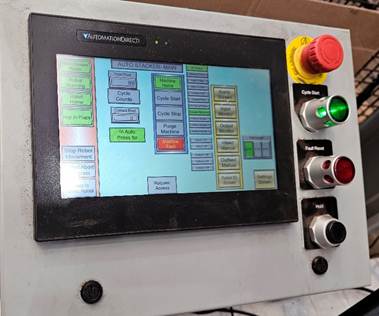
Equipment setup parameters are built into the HMI so operators can adjust them without outside help (Figure 3). The line handles more than one post length, and each size needs slightly different timing to move and stack correctly. Putting that control on the touchscreen means the end user can switch products and make adjustments themselves. It’s a practical decision that reduces dependency on the SI after the job is done, which most customers appreciate.
The Robot Handshake
Connecting the PLC to the robot controller over EtherNet/IP went smoothly for the most part. One issue did surface early in setup, though. The robot’s communications weren’t coming up cleanly, and nothing in the configuration pointed to an obvious reason why.
A quick call to the AutomationDirect tech support line led to the solution; the issue traced back to a single checkbox in Productivity Suite’s EtherNet/IP hardware configuration, an option called “Include Run/Idle Header.” When connecting to more typical hardware, this setting rarely comes into play. The robot controller, however, needed it to be enabled to properly interpret the incoming data. Once that was addressed, the connection came up and held. It’s the kind of setting that’s easy to overlook, especially with third-party equipment that has its own communication requirements. Getting the answer in one call, rather than spending hours working through it independently, kept the project on schedule.
The Finished Product
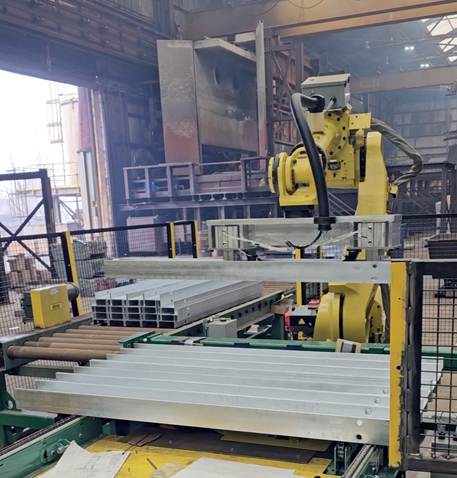
Once commissioned, the system delivered consistent, repeatable performance, and operators can easily change product types and perform fine-tuning as needed on the fly. Posts move from the galvanizing area through the infeed, get gathered and picked up by the robot, stacked into bundles, and sent out, without much required of the operator beyond starting each cycle and managing product changeovers from the HMI (Figure 4).
This project was fairly typical of day-to-day work: technically involved, but grounded in a set of familiar tools. AutoWorks has built a business around that kind of consistency, and the combination of trustworthy hardware, no-cost software, and accessible technical support is a meaningful part of what makes a one-person shop like this viable over the long haul, and essential for many types of end users.
All figures courtesy of Mike Watkins
Author Bio

Mike Watkins is the founder of Autoworks, a controls and automation company focused on PLC programming, HMI development, electrical design, troubleshooting, and machine upgrades. Before starting Autoworks, Mike spent eight years in the U.S. Navy Nuclear Power Program, where he built a strong technical foundation in complex electrical, mechanical, and control systems. He also earned an electrical engineering degree from the University of Dayton. Today, Mike uses that experience to help manufacturers modernize equipment, improve reliability, and solve difficult production issues with practical, real-world automation solutions.